
Weekly Work Schedule Template
Plan a week of shifts for your team. Enter each person's start and end times and unpaid break, and the schedule calculates hours per shift, weekly hours per person, staff on each day, and flags anyone over 40 hours. Print it for the break room or share it as a PDF.
- Free to use
- No sign-up
- Runs in your browser
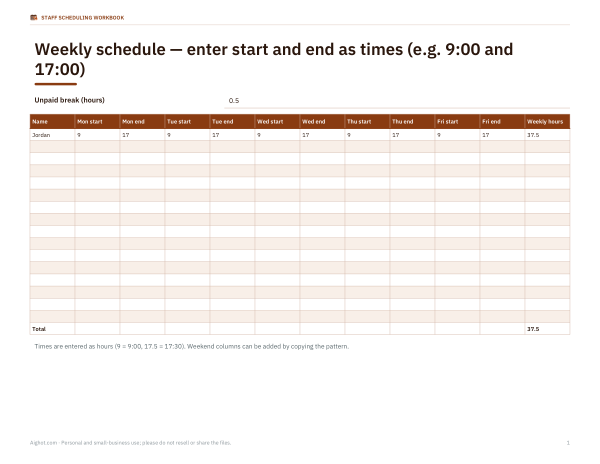
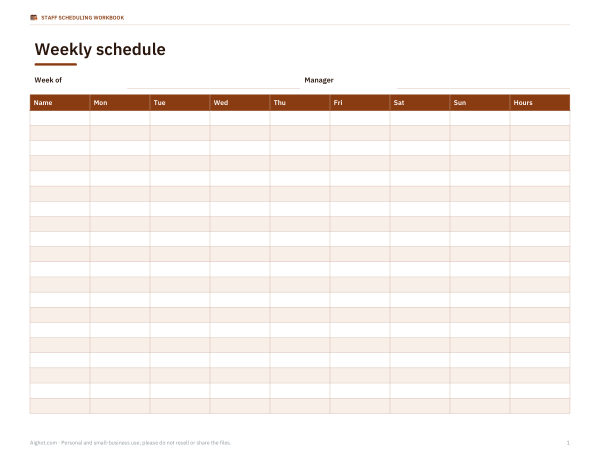
Build the weekly schedule
Enter shifts as 9-17, 9:30-18:00, 7a-3p or 22-6 (overnight). Leave blank or type OFF for days off.
Staff Scheduling Workbook
An Excel rota with automatic hours, four-week rotations, availability and time-off tracking, plus printable weekly and monthly schedules.
- Weekly rota with hour totals (XLSX, PDF)
- Printable schedule & availability forms (PDF, DOCX)
Formats: XLSX, PDF, DOCX. Instant download after payment (link valid 72 hours, up to 5 downloads). AI-assisted: the templates were drafted with AI help and reviewed and laid out before publishing.
$5.00 USD, one-time
- Instant download
- 7-day refund
- Secure checkout by Stripe
7-day money-back guarantee. Full refund within 7 days of purchase, even after you download.
Full refund within 7 days — see the refund policy and license.
Free printables
Single sheets you can print right now, no sign-up. The full pack adds every sheet in one download plus the editable files.
How to use the weekly schedule
- Choose the week start date and the unpaid break deducted from each shift.
- Type each person's name and their shift for each day, such as 9-17, 9:30-18:00, 7a-3p, or 22-6 for an overnight shift. Leave days off blank or write OFF.
- Check the hours column. Each shift's length minus the break is added up; anyone above the overtime threshold is flagged in red.
- Look at the coverage table below the grid to see how many people and hours are scheduled each day.
- Print the schedule for the break room or save it as a PDF to share, or download a CSV for payroll.
Shift times entered in 24-hour format are the least ambiguous. The schedule treats a shift that ends earlier than it starts as running past midnight, so 22-6 counts as 8 hours before the break.
What a good work schedule includes
- Every employee's name and role, if roles differ.
- Exact start and end times, not just “morning” or “evening”.
- Days off clearly marked.
- The dates of the week, so there is no confusion across weeks.
- Breaks, if they are scheduled at set times.
- A contact for swaps and absences, and the date the schedule was published.
Calculating hours and overtime
Scheduled hours per shift are the time between start and end minus any unpaid break. Weekly totals help you avoid unplanned overtime: under the US Fair Labor Standards Act, non-exempt employees generally earn time and a half for hours over 40 in a workweek, and some states add daily overtime rules. The schedule flags weekly totals above your chosen threshold so you can rebalance shifts before publishing. Scheduled hours are a plan, not a timesheet; pay should be based on hours actually worked.
Worked example
Jordan works 9-17 Monday to Friday with a 30-minute unpaid break: 7.5 hours a day, 37.5 for the week. Lee works four evening shifts of 15-23 or 16-24, 7.5 hours each after the break, for 30 hours. Priya has five shifts of 7.5 hours, 37.5 hours; Sam five, 37.5 hours. The coverage row shows three people on most weekdays and two at the weekend, which lets a manager see immediately that Sunday lunchtime relies on a single person.
Scheduling tips that reduce no-shows and conflict
- Publish schedules as far ahead as you can — many workers need at least a week or two to plan childcare, transport and second jobs. Some cities and states have predictive scheduling laws requiring advance notice for certain employers.
- Rotate weekend and closing shifts fairly and keep a record of who worked them.
- Avoid “clopening” — a closing shift followed by an opening shift the next morning — where you can; it leaves little time to rest.
- Ask for availability in writing and store it with the schedule.
- Set a clear, simple process for swaps and approve them in writing.
- Build in overlap during shift handovers for busy periods.
Common shift patterns
| Pattern | Typical shifts | Used in |
|---|---|---|
| Standard day | 9–17 or 8–16, Monday–Friday | Offices, clinics |
| Two-shift | 7–15 and 15–23 | Retail, hospitality, light manufacturing |
| Three-shift / 24-hour | 7–15, 15–23, 23–7 | Healthcare, security, logistics |
| Split shift | e.g. 11–14 and 17–21 | Restaurants |
| 4×10 compressed | Four 10-hour days | Maintenance, some offices |
| 12-hour rotation | Two or three 12-hour days, then days off | Hospitals, plant operations |
Printing and sharing
The printed schedule shows names, daily shifts with dates, OFF days and weekly hours in a landscape-friendly table. Post it where everyone can see it, or save a PDF and send it through your team chat. Keep a copy of each published schedule — it is useful for payroll checks and, in places with scheduling laws, as a record of what was published and when.
Handling time-off requests and last-minute changes
Collect time-off requests in one place, with a deadline before each schedule is drafted, so you are not rebuilding the week after it is published. When a change is unavoidable, update the schedule, note the date of the change and tell everyone affected directly rather than relying on them noticing a new printout. For recurring availability — a student who cannot work Tuesday afternoons, for example — keep a short availability list next to the template and check it every time you build a new week.
Frequently asked questions
How do I enter an overnight shift?
Type it as it happens, for example 22-6. A shift that ends earlier than it starts is counted as running past midnight.
Does the schedule deduct lunch breaks?
Yes, the unpaid break you enter is deducted from every working shift.
Can I use 12-hour times?
Yes, such as 7a-3p or 9:30a-6p, but 24-hour times are clearest.
Is the schedule saved?
No. Print it, save it as a PDF or download the CSV before closing the page.
Can it plan more than one week?
It plans one week at a time. The paid workbook covers four-week rotations and a full year of hours.
Why is someone flagged?
Their scheduled weekly hours exceed your overtime threshold (40 by default).
Can I print the schedule without hours?
The printed version includes weekly hours so staff can check them; cover the column or delete it from a CSV copy if you prefer.
Does it handle split shifts?
Enter the day as two separate time blocks in the notes, or add a second row for the same person; the tool counts one shift per cell.